

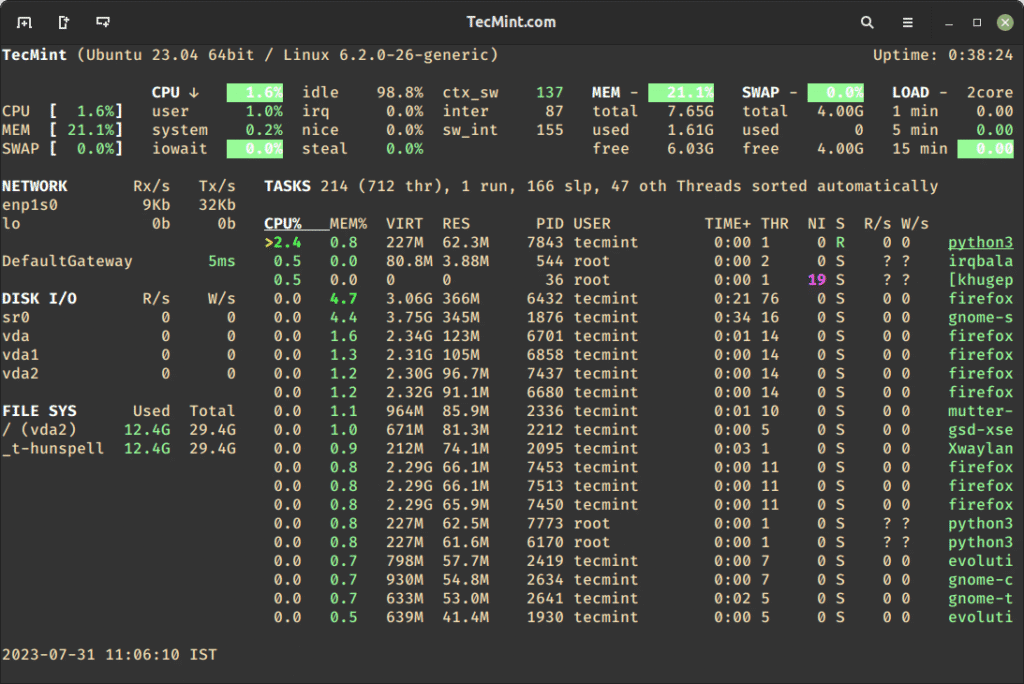
Glances: Keep an Eye on Your System at a Glance
Monitoring your system is no longer optional. Whether you’re managing a Linux server, running containers, or maintaining a workstation, understanding how your resources are being used is critical. Glances is a powerful yet lightweight system monitoring tool that gives you a complete overview of your system’s health—all in one place.
With Glances, you don’t need multiple commands or dashboards. One glance is enough.
What Is Glances?
Glances is an open-source, cross-platform system monitoring tool written in Python. It collects and displays key performance metrics such as CPU usage, memory, disk I/O, network activity, and running processes in a single, easy-to-read interface.
It works locally, remotely, and even inside containers, making it a great fit for modern Linux and Docker-based environments.
Why Use Glances?
Performance issues rarely happen suddenly. They build up over time—high CPU usage, memory exhaustion, disk saturation, or network congestion. Glances helps you spot these issues early before they impact users or applications.
With Glances, you can:
- Monitor system health in real time
- Quickly identify bottlenecks
- Troubleshoot performance problems
- Keep servers and containers running smoothly
Key Features at a Glance
- Unified dashboard for CPU, memory, disk, network, and processes
- Color-coded alerts (green, orange, red) for instant awareness
- Process monitoring to identify resource-heavy applications
- Lightweight and fast, suitable for servers and containers
- Client/server mode for remote monitoring
- Web UI and API support for extended use cases
Installing Glances on Linux
Glances is available in most Linux distributions and is easy to install.
Option 1: Install Using Package Manager
Ubuntu / Debian
sudo apt update
sudo apt install glances
RHEL / CentOS / Rocky Linux
sudo dnf install epel-release
sudo dnf install glances
Arch Linux
sudo pacman -S glances
Option 2: Install Using pip (Latest Version)
If you want the latest features, you can install Glances using Python’s package manager:
sudo apt install python3-pip
pip3 install glances
Once installed, start Glances by running:
glances
Within seconds, you’ll see a full overview of your system.
Installing and Running Glances with Docker
If you’re working in a containerized environment, Glances runs perfectly inside Docker.
Step 1: Pull the Official Glances Image
docker pull nicolargo/glances
Step 2: Run Glances in Docker
To monitor your host system, run:
docker run -d \
  --name glances \
  --restart="always" \
  -p 61208:61208 \
  -v /var/run/docker.sock:/var/run/docker.sock:ro \
  -v /sys:/sys:ro \
  -v /proc:/proc:ro \
  nicolargo/glances
Step 3: Access the Web Interface
Open your browser and go to:
http://localhost:61208
You’ll now have a real-time, web-based monitoring dashboard powered by Glances.
Monitoring Remote Systems
Glances also supports client/server mode, allowing you to monitor multiple machines from one location. This is especially useful for small clusters or home labs without heavy monitoring stacks.
When Should You Use Glances?
Glances is ideal when you want:
- Quick system health checks
- Lightweight monitoring without complex configuration
- A terminal-based or web-based overview
- Visibility into Docker and Linux systems
While it may not replace enterprise monitoring tools, Glances shines in day-to-day operations and rapid diagnostics.
Final Thoughts
Glances lives up to its name. It delivers powerful insights without complexity, making system monitoring accessible and efficient. Whether you install it directly on Linux or deploy it with Docker, Glances helps you stay proactive instead of reactive.
If you want a monitoring tool that’s simple, fast, and effective, Glances deserves a place in your toolkit.